Coming soon · DNEP is not open to schools yet. Look around, try the demo, or get in touch.
DNEP — Discover, Nurture, Empower, Progress
Try the demo Get started
For teachers and departments · every subject · KS2 to A level

Plan the week. Mark the test. Print the feedback.

The DNEP Lesson Planner and Topic Assessment Tracker run on your school Google account. Your timetable, your scheme of work, your resources and every pupil's marks are in one place, ready for the next lesson.

Try the demo Set it up for my department

Google Calendar · Google Classroom · Google Drive · staff-only access

DNEP LESSON PLANNER
This week Classes & progress Schemes of work Students 2 Homework 4 Notes Set change exams PGCE trainees Teacher links Settings
Week 6 · Autumn 1
This week
Sync with Google CalendarSet cover work
MonTueWedThuFri P1
S4P/Ma1
Compound interest
Free
12 Core Maths
Normal distribution
S4P/Ma1
Depreciation
9Y/Ma2
Angles in polygons
P2
9Y/Ma2
Interior angles
12 Core Maths
z-scores
Retrieval practice
9Y/Ma2 · topic waits
End-of-topic test
9Y/Ma2 · Angles
12 Core Maths
Past-paper practice
P3
12 Core Maths
Normal curve
S4P/Ma1
Simple interest
9Y/Ma2
Exterior angles
Free
Computer lesson
P Lesson deck W Worksheets H Help sheet V Vocabulary & retrieval cards T Ten Ticks C Corbettmaths O Oak M MathsCloud
Teachers

Your timetable, already filled in.

  • Reads your Google Calendar and turns it into your timetable
  • Every class gets its scheme of work automatically
  • Every lesson links to its deck, worksheets, help sheet and free resources
  • Notes, calls home and Google Classroom homework next to the lesson
Try the demo
Heads of department

One faculty. One plan.

  • Faculty timetable and every teacher's planner, one click away
  • Every teacher of a class sees the same marks
  • Set change tests with papers by set and moves you can approve
  • PGCE trainee timetables and mentor meetings built in
Set it up for my department

Online homework scores can't be trusted any more. Tests marked in class can.

Students can get any online answer from AI in seconds, so platform data no longer shows what they can do. DNEP keeps assessment on paper and in the classroom. You give a short topic test, type in the marks, and the tracker turns them into the feedback and analytics.

Our resources

Ready-made lessons, written by teachers

Every lesson comes as a set: a slide deck that teaches it step by step, worksheets, a help sheet, vocabulary cards and an end-of-topic test with its mark scheme. Around them: revision lessons, topic books, flashcards, assessments and learning journeys, all in one house style and linked to the scheme of work, the planner and the tracker. DNEP works for every subject a school teaches; these are the resources we offer now.

What we offer
Maths · KS2Maths · KS3Maths · KS4 (GCSE and IGCSE)Maths · KS5 (A level and Core Maths)Functional Skills mathsComputing · KS3Computing · KS4 (GCSE)
✓ Lesson decks✓ Retrieval starters✓ Worksheets✓ Help sheets✓ Vocabulary cards✓ Revision lessons✓ Topic books✓ Flashcards✓ Revision booklets✓ Topic tests✓ Assessments✓ Mark schemes✓ Learning journeys
KS2 mathsYear 5 · Place value
KS3 mathsYear 7 · Sequences
KS4 mathsYear 10 · lessons and revision
AssessmentsTopic tests and assessments with mark schemes
Revision and planningTopic books, flashcards and learning journeys
KS5 and post-16A level, Core Maths and Functional Skills
KS4 computingYear 10 · OCR GCSE J277 · 2.1 Algorithms

These are small previews. Schools get the full resources, editable, through DNEP.

The Lesson Planner

Take back your evenings

STEP 1 · PLAN

A week that plans itself

Calendar to timetable. Class names like "S3P/Ma1 - Mathematics" are recognised and joined to the right class.
Scheme of work on autopilot. S3x is Year 7, S4x is Year 10 Foundation, and the rest follow year and set. Every lesson shows what to teach.
Lessons that move with you. Mark a slot as retrieval practice, a computer lesson or no lesson, and the topic waits for the next slot.
Cover work. Set cover from the lesson you'd planned, straight from the week view.
S4P/Ma1 · Wednesday P1Year 10 Foundation · Wk 6
What to teach: Compound interest and depreciation
My prepared lesson Textbook exercises Solution bank Last year's lesson Dr Austin · Mr Barton Ten Ticks worksheet
Notes for this lesson Change topic from this lesson… Re-teach
Students · calls home to make
Pupil A · S4P/Ma1 · homework missing twiceTo call
Pupil B · 9Y/Ma2 · positive callCalled
Homework (Google Classroom)
9Y/Ma2 · Angles practiceDue Friday · 21/28 in
STEP 2 · TEACH

Everything about the class, next to the lesson

Student log. Add a note about a student, keep a list of calls home to make and tick them off.
Homework. See what's due and recently due from Google Classroom without leaving the planner.
Teacher links. Corbettmaths 5-a-day, MathsBot, Dr Austin grids and free A-level resources on every lesson.
PGCE trainees. Add a trainee, allocate classes, and their timetable and mentor meetings appear in the planner.
STEP 3 · ASSESS

The Topic Assessment Tracker

No set-up for tests. For each topic the tracker finds the test in your Feedback Marking folder and reads the questions, marks, learning objectives and Red, Yellow and Green feedback.
Pupils from Google Classroom. If Classroom isn't set up, you can paste names or import a CSV or Excel list.
Marks question by question. Print a mark sheet, mark on paper, then type in the marks. Method and Presentation (0–3) are scored automatically from the total.
Class progress and a results report. Topic averages, bands on each test, the sub-skills to re-teach and every pupil's average, all as charts you can print.
9Y/Ma2
Enter marks: Angles
Saved for every teacher of this class
PupilQ1/4Q2/4Q3/6Q4/6TotalBandMP
Pupil A435214Yellow22
Pupil B21205Red11
Pupil C446620Green33
Create feedback stickers Print mark sheet Results report
STEP 4 · FEED BACK

A personal sticker for every book, plus the next lesson's feedback questions

Feedback stickers

Click Create feedback stickers, choose the test and print. There are six to an A4 page, on label sheets or plain paper.

Score, % and band with the Red, Yellow or Green comment from your test's template.
Every question as a bar, so pupils can see exactly where they lost marks.
Course so far. A donut chart of topics mastered, partly mastered and needing work, plus the pupil's overall average.
Focus for next steps comes from their two weakest questions. Full marks gets the challenge question instead.
Method and Presentation scores and space for your own comments.

DNEP
Angles in polygonsDemo School · Maths
08/10/2026
Pupil AClass 9Y/Ma2
Overall (all topic tests): 68%Yellow
14/2070%Yellow
Good effort. You know most of the angle facts. Check your working on the harder questions.
Q1 Angle facts4/4
Q2 Triangles3/4
Q3 Interior5/6
Q4 Exterior2/6
Method 2/3 · Presentation 2/3
Course so far
FOCUS FOR NEXT STEPS
Revise how to find exterior angles of a regular polygon · Revise interior angle sum
Comments
Feedback questions · Angles · 9Y/Ma2 Print · Present
Re-teach 1 · Q4 Exterior anglesclass avg 38%
Most common mistake: using 180° instead of 360° for the sum of the exterior angles. Try: A regular polygon has exterior angles of 24°. How many sides does it have?
Re-teach 2 · Q3 Interior angle sumclass avg 57%
Most common mistake: using n × 180° instead of (n − 2) × 180°. Try: Find the sum of the interior angles of a hexagon.
Full-marks challenge · 3 pupils A regular polygon has interior angles 4 times its exterior angles. How many sides does it have?

Feedback questions

This is a separate page from the stickers. Print it for books or put it on the board for DIRT time.

Re-teach next. Taken from the latest test: the questions and sub-skills with the lowest class average.
Most common mistakes written out, so the class can see what went wrong.
Follow-up questions on the same skill, so each pupil practises the thing they missed. Their sticker tells them where to start.
Full-marks challenge for pupils who got everything right, so no one sits waiting.
Coming next

Seating plans and exams built from your tracker data

The tracker already has your class lists and question-level marks, so these tools start from data other tools don't have.

Seating Plan Maker

Draw your room once. Drag pupils in, or let DNEP suggest a plan from the latest band data.

Arrange by band. Mixed Green/Red pairs, or groups by the sub-skill they need to re-teach.
Rules that stick. "Keep apart" and "front of room" stay when you reshuffle.
Board view. Names only on the projector, a print with data for cover and observations.
Room M12 · 9Y/Ma2
WHITEBOARD
ABCD EFGH IJKL MNOP QRST UVWX YZBA DCFE HGempty
■ Green 80%+■ Yellow■ RedLatest topic test
Year 10 WX · set change test40 marks
Paper A · sets 1 & 2 Paper B · set 3 Paper C · sets 4 & 5
1. Reverse percentages4
2. Compound interest5
3. Simultaneous equations6
4. Added from tracker: standard form (year group avg 41%)4

Exam Builder

Now in the demo. Build anything from a 10-mark mini test to a set change paper, using topics in your scheme's order.

From your HW Templates. Choose questions by topic, then mix and re-mark them.
Targets the gaps. One click adds questions on the weakest sub-skills across the class or year group.
Papers by set. Set up which sets sit Papers A, B and C, then run the same set-change process you use now (moves, new set lists).
Closes the loop. Each exam goes into the tracker ready for marking, stickers and feedback questions.
Coming later

SEND and inclusion bases in mainstream schools

Inclusion bases are the Department for Education's name for provision inside mainstream schools for pupils with additional needs (guidance published June 2026). We plan to support them in DNEP: plans, progress and reviews for pupils who learn partly in the base and partly in mainstream lessons, joined up with the same tracker and lesson plans.

Exam Builder · maths question banks now, more subjects to follow

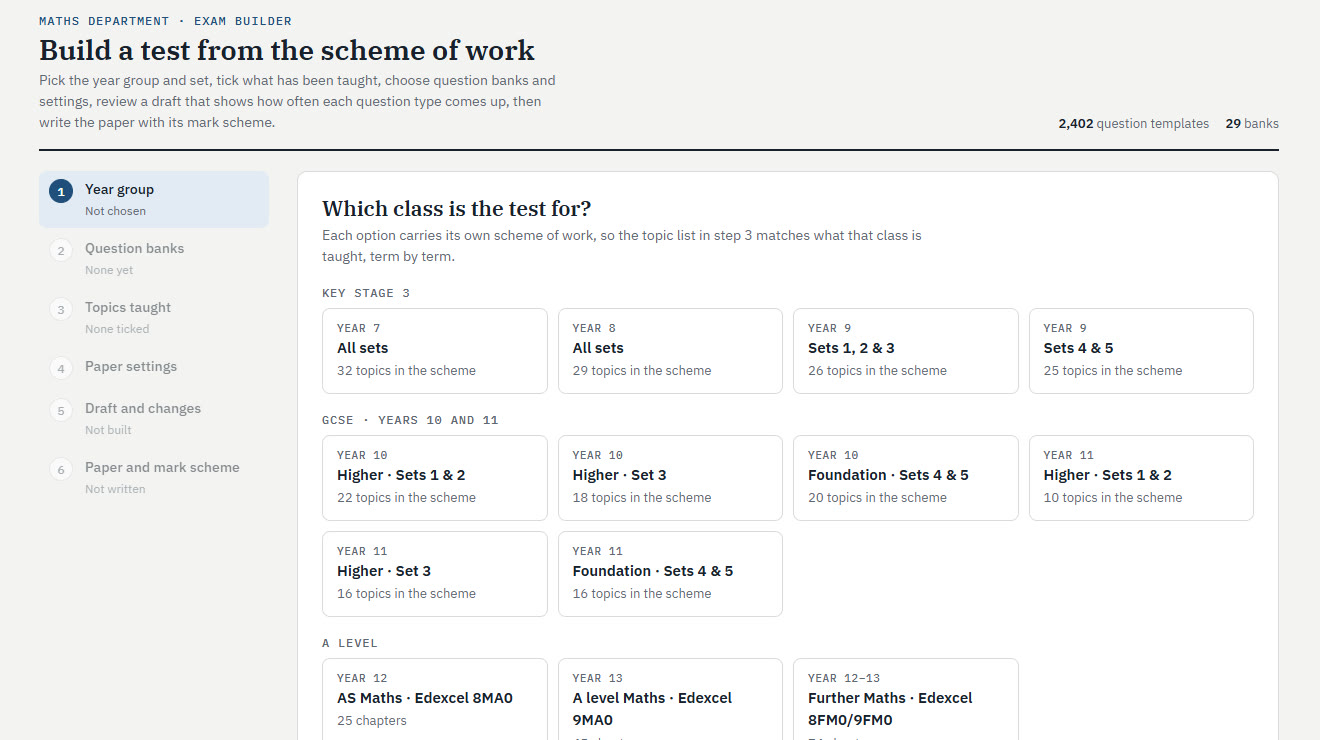
Build a test from the scheme of work

Pick the year group and set, tick what has been taught, choose question banks and settings, review a draft that shows how often each question type comes up, then write the paper with its mark scheme.

2,402 question templates29 banks
  1. 1Year groupKS3, GCSE Higher and Foundation by set, AS, A level, Further Maths and Core Maths
  2. 2Question banksChoose from 29 banks of question templates
  3. 3Topics taughtThe class's own scheme of work, term by term: tick what has been taught
  4. 4Paper settingsLength, marks and the rest of the paper's settings
  5. 5Draft and changesSee how often each question type comes up and make changes
  6. 6Paper and mark schemeThe paper with its mark scheme, ready to print, and into the tracker for marking
The DNEP Exam Builder: step 1, choosing the class the test is for
The Exam Builder as it looks now.Open it in the demo →

One loop instead of four tools

Most schools combine a planner, a seating tool, a test bank and a spreadsheet. DNEP connects all four.

Feature DNEP Common Planner Planboard Class Charts Exampro / Save My Exams
Lesson planning from the scheme of work✓✓✓——
UK timetable from Google Calendar✓US standardsPartialFrom MIS—
Question-level marks for topic tests✓—Gradebook—Partial
Printed feedback stickers✓————
Feedback questions from class mistakes✓————
Set change tests and new set lists✓————
Seating plans from your dataComing——✓—
Exam / test builder✓———✓
Cover work from the planned lesson✓Sub plans———

Compared using each product's public website, October 2026.

Plan less. Teach more. Feed back better.

Try the demo: a made-up school with the real DNEP planner, tracker, stickers, cover work and Exam Builder. Sign-in for Google and Microsoft schools is coming soon.

Try the demo Bring DNEP to my school
Contact

Join the pilot

DNEP is coming soon. Pilot schools use it free, and places are offered first come, first served from the waiting list. Prices will be published later. Join the list or ask us anything.

Despina Nicolaou and Erich Pohl
DNEP Education